


Macquarie
Macquarie is a leading provider of financial, advisory, investment and funds management services in Australia.
Jump to: Connect a Macquarie CMA | Connect a Macquarie MAA | Unsettled Trades Adjustment | Add subsequent CMAs
How we work together
Sharesight leverages Macquarie to provide Cash Management Accounts (CMA) and Macquarie Accelerator Accounts (MAA) for Sharesight Business partners, allowing them to track their clients' cash balances alongside their listed investments.
There are three ways to track cash investments such as bank accounts, term deposits, fixed interest securities, and broker-linked cash accounts in Sharesight Business:
- Integrate a Macquarie Cash Management Account (CMA) or Accelerator Account (MAA) (see information below)
- Integrate a Xero cash account
- Create and track them manually by using a Custom Holding
Macquarie Cash Management Accounts (CMAs) can be integrated into individual portfolios on Sharesight Business, meaning an up-to-date and ongoing cash balance will be automatically displayed within Sharesight. Macquarie requires that you establish ESI credentials between your Macquarie account and your Sharesight account. These credentials will need to be renewed every 12 months. Once you've connected your ESI credentials, adding additional CMAs to portfolios is a simple, one-step process.
Connecting your Macquarie Cash Account
Note: Macquarie CMA is only available on Sharesight Business.
Note: Only the account owner or staff with owner-level access can create the connection. All other staff members can only add the account from step 5 onwards.
-
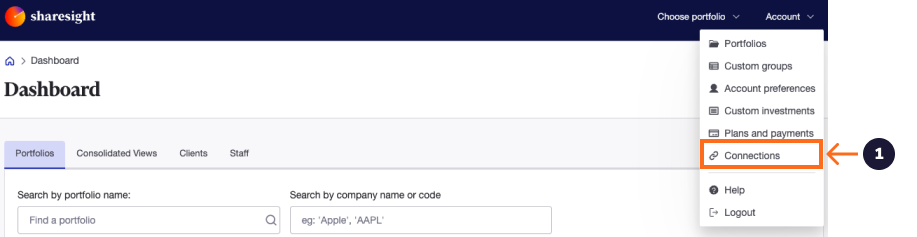
When logged into your Sharesight Business Dashboard, click the account menu and select the Connections option.
-
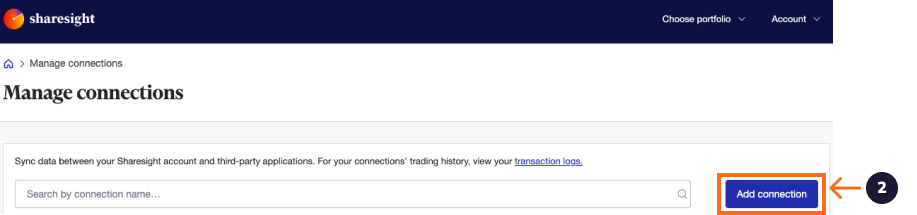
Click to add a connection.
-
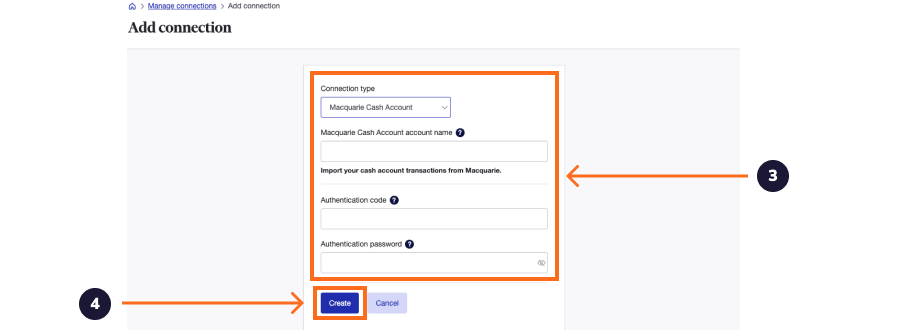
Select the Macquarie Cash Account option and enter your ESI credentials. To obtain these, log into Macquarie Adviser Online and:
- Select the user profile icon from the right-hand side of the top menu and choose ESI details.
- Click Generate new code, then select Send.
- If you've registered for Macquarie Authenticator: open the push notification, review the details, and click Approve.
- If you're not registered for Macquarie Authenticator: enter the one-time SMS code sent to your registered mobile number.
- Click Submit.
- Copy and paste the Authentication Code and Password displayed in Macquarie Adviser Online into Sharesight to authorise the ESI data feeds.
Note: ESI access codes expire one year from the date they are created. Once expired, any data sharing under these credentials will cease, so Macquarie recommends updating your ESI access code with Sharesight before it expires. If you require further assistance, refer to the Macquarie help page or contact Macquarie.
-
Once entered, click to create the integration.
-
To add your newly created CMA account to your Sharesight portfolio, go to the portfolio you wish to add it to from your Pro dashboard.
-
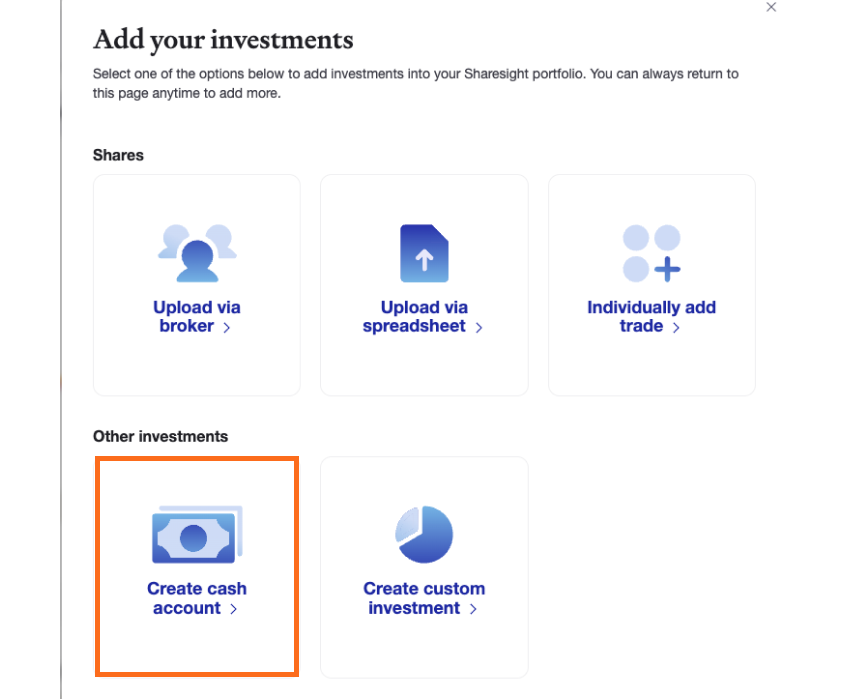
Click the Add Investment button from the investments page and select the Create Cash account tile.
-
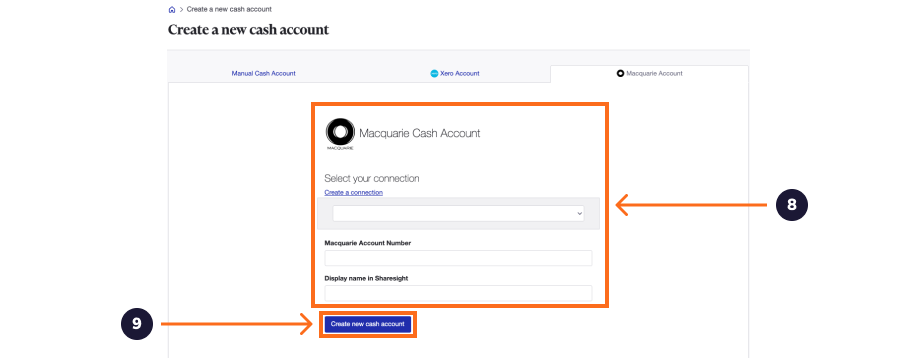
Click on the Macquarie option.
-
Select the Macquarie account you wish to add and enter the account number and a name to appear in Sharesight. The account number must match the account number of the CMA.
-
Once entered, click create to add the account to your portfolio.
Once added, Sharesight will retrieve your CMA transaction history from Macquarie and display your current balance. This also serves as the cash holding detail page. On this page you can search for cash-specific transactions or export the data to Excel or PDF.

Back on the Portfolio Investments page, you'll now see a new section called Cash Accounts, which includes your CMA. This balance will be automatically updated every day. Clicking into this holding will display the CMA transactional history.

Connecting your Macquarie Accelerator Account (MAA)
Sharesight also integrates the Macquarie Accelerator Account (MAA), which can be added to your Sharesight Business portfolio alongside your CMA.
Unsettled Trades Adjustment
If you use the Macquarie CMA account for funding trades, you can also use a feature that will automatically account for any portfolio balance discrepancies due to unsettled trades. Since trades appear in Sharesight in a matter of seconds, but the cash is not debited from the funding account for up to three days (T+3 rule), this feature will automatically offset the value of the newly purchased shares with the appropriate amount of cash.
This unsettled cash balance will then automatically reverse itself after three days. When this is in effect you'll notice a new line item under the CMA titled Unsettled Trades Adjustment.

To toggle this feature on or off, go to the Settings menu within the portfolio and tick the box next to Calculate Cash Accounts Adjustments.

Adding Subsequent Macquarie CMA Accounts
Once you've established your ESI connection with Macquarie, you will not need to repeat this step. Adding subsequent CMA accounts can be done by selecting Existing Credentials on the setup page. Simply enter the account number and give the cash holding a name.